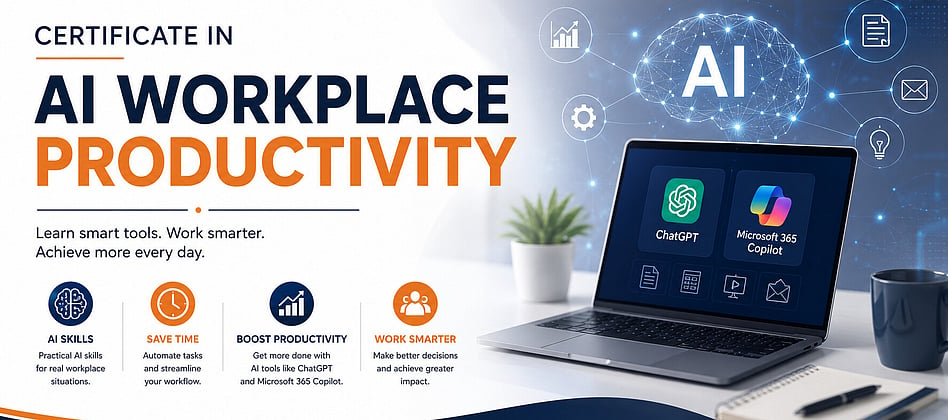
Certificate in AI Workplace Productivity Course
Practical ChatGPT & Microsoft Copilot Skills for the Modern Workplace
Thursday evenings
8, 15, 22, 29 October and 5, 12 November
6.30pm - 8.30pm
This six-week live course is designed to build practical AI productivity skills for real workplace situations. Learners watch the instructor complete connected workplace tasks live using ChatGPT and Microsoft 365 Copilot. The learners can learn and practice live or use the recording and learner resources to practise the same skills in their own time.
The course is built around Bamiyan Business Co, a complete fictional operating company. Its staff, customers, documents, emails, spreadsheets, business scenarios and datasets allow learners to see how AI can be applied across everyday office work without using real confidential workplace information.
Course Foundation: Understanding AI and the Changing Workplace
Before the practical modules, learners are given a concise foundation so they understand what AI is, why it matters and how it is changing work including:
What Artificial Intelligence (AI) and Generative AI are, explained in plain language.
A brief history of AI and the rapid development of modern Generative AI.
How AI is changing traditional jobs, tasks and skills, including the difference between job exposure, job transformation and job displacement.
Emerging jobs and new opportunities created or reshaped by AI.
AI and the Fourth Industrial Revolution. How digital technologies are changing organisations and the nature of work.
How AI can improve workplace efficiency and productivity when used appropriately.
The rapid uptake of AI in New Zealand workplaces, including the shift from experimentation toward integration and scaling.
AI limitations, hallucinations, accuracy, privacy, confidentiality, bias and the importance of human judgement.
Responsible AI use and the need to follow organisational AI policies.
Overall Course Learning Outcomes
Use ChatGPT and Microsoft 365 Copilot confidently for practical workplace productivity tasks.
Write clear prompts using role, task, context, audience, requirements and output instructions.
Use follow-up prompts to refine, improve and verify AI-generated work.
Draft, improve and adapt professional workplace communication for different audiences and situations.
Create, edit and improve workplace documents in Microsoft Word with AI assistance.
Use AI with Excel to organise, understand and analyse workplace data and communicate useful findings.
Prepare meeting materials, minutes, action lists, work plans and other organisational outputs.
Create professional marketing and social media content, including Facebook, LinkedIn and flyer copy.
Select the most suitable tool for a task rather than assuming one AI tool is best for everything.
Recognise AI limitations and apply privacy, confidentiality, organisational policy, verification and human judgement.
Combine ChatGPT, Copilot and Microsoft 365 into repeatable end-to-end workplace workflows.
Course Structure
Module 1: Your AI Workplace Assistants
ChatGPT & Microsoft 365 Copilot Fundamentals
Understand the workplace roles of ChatGPT and Microsoft Copilot.
Learn how to write clear and effective prompts.
Refine AI responses using follow-up prompts.
Understand and summarise workplace documents and identify missing information.
Turn messy information into organised tasks, priorities and professional outputs.
Compare ChatGPT and Copilot for similar tasks and choose the tool that fits the work.
Apply verification, responsible AI use and human judgement.
Module 2: Professional Communication with AI
Emails, Word Documents & Everyday Workplace Writing
Draft clear, professional workplace emails and adapt tone for different audiences.
Summarise lengthy workplace information into useful key points, briefings and messages.
Turn rough information into a professional Word document such as a procedure, memo or client briefing.
Review and improve an existing Word document for structure, readability, consistency and professionalism.
Use Excel data to identify overdue actions, missing information, customer follow-ups and exceptions requiring communication.
Turn spreadsheet findings into concise manager updates and targeted workplace messages.
Review, refine and verify AI-generated communication before using or sending it.
Module 3: Meetings, Planning & Workplace Organisation
Work Smarter with AI
Prepare meeting agendas and supporting information.
Turn meeting notes and transcripts into professional minutes.
Extract decisions, action items, responsibilities and deadlines.
Use AI to organise tasks, priorities, checklists and work plans.
Convert unstructured information into clear, actionable workplace outputs.
Use Copilot within Microsoft 365 to support everyday planning and organisation.
Review AI-generated actions and deadlines against the original source.
Module 4: Excel, Data Analysis & Business Insights
Turn Workplace Data into Useful Information
Use AI to understand and work with practical Excel datasets.
Ask questions about workplace data using natural language.
Create, explain and troubleshoot Excel formulas with AI assistance.
Clean, organise and analyse workplace data.
Identify trends, patterns, exceptions and important business information.
Turn analysis into useful insights and management commentary.
Present findings clearly for managers and decision makers while verifying calculations and source data.
Module 5: Marketing & Content Creation with AI
Create Professional Workplace Content Faster
Generate practical marketing and campaign ideas using AI.
Create professional Facebook and LinkedIn content.
Write promotional, educational and engagement-focused social media posts.
Develop copy and content ideas for flyers and promotional materials.
Adapt one core message for different audiences and platforms.
Improve headlines, calls to action, structure and marketing copy.
Create content more efficiently while preserving brand voice, accuracy and human review.
Module 6: AI-Powered Workplace Productivity
Bringing Everything Together
Combine ChatGPT, Copilot and Microsoft 365 in practical multi-step workflows.
Turn source information into emails, documents, analysis, summaries and presentations.
Select the best AI tool for each stage of a workplace task.
Improve outputs through prompting, refinement, verification and iteration.
Apply privacy, confidentiality, accuracy, ethics and organisational AI policy requirements.
Build a repeatable personal AI productivity workflow.
Complete an integrated Bamiyan Business Co workplace scenario using the skills developed across the course.
Dates
8, 15, 22, 29 October and 5, 12 November
6.30pm - 8.30pm
These webinars will be delivered online via Zoom. You will be sent the link upon registration.
Price
Course Fee $450 per person inclusive of GST
Payment in full is required before commencement of the training.
Why should you enrol in this course?
By the end of this course, you’ll be equipped with a robust AI toolkit, enriched with practical experiences, the latest research insights, and expert perspectives. Armed with this comprehensive knowledge, you will be well-prepared to make informed, ethical decisions in the AI-driven world. Elevate your career, make your mark, and confidently embrace the future of work by building certainty in an uncertain future. Join us and revolutionise the way you work with AI!
Registration and Cancellation Details
Payment online is by Debit or Credit Card: VISA, Mastercard or American Express only and there are 3 easy steps to complete the online booking process.
Our registration platform is hosted by Lil Regie, our NZ based booking agent. Upon completing your registration by hitting the blue 'Confirm Booking' button, you will receive an automated email from Lil Regie confirming the booking and amount paid by credit card. This will appear on your statement as from LIL REGIE LTD WELLINGTON. A GST Tax Invoice showing your payment in full will also be emailed to you.
If you have any issues or questions about your booking, please contact Nathalie van Dort on 021 066 9811 or email: nathalie@grow.co.nz
We work hard to ensure that all workshops are cost effective by automating our systems. If you require an invoice (rather than paying by debit or credit card) there will be a $25.00 inc GST surcharge for this, and you will need to supply:
The full name and postal address required to appear on the invoice.
The contact name and email of the person(s) responsible for authorising this expense and approving payment.
Any purchase order references required on vendor invoices.
Please email nathalie@grow.co.nz if you would like to reserve a place, as our workshops fill quickly.
What happens if you have to cancel?
We know that sometimes your plans can change for many different reasons. Should you be unable to attend, a substitute delegate is welcome to attend at no extra cost. If a substitute delegate is not available and you need to cancel your registration, please be aware of the following:
Up to 7 days prior to the event you will be provided a refund of your registration cost, less a $20.00 inc GST per attendee service charge.
If you cancel within 7 days of the event, you are not eligible to receive a refund. Please note: should your registration not be paid by the time of the event, you are still liable to make the payment. Unpaid accounts may be passed over to our debt collection agency and additional costs may be incurred.
All cancellations must be received in writing via email.
Training is cancellable by GROW with 3 days’ notice if a minimum number of attendees is not met and full refunds will be provided.
Please note: GROW Ltd reserves the right to make any amendments that we may deem to be in the best interest of the forum – it is however very unlikely and we will notify you as soon as possible should this occur.
For more information see our full Terms of Trade.
About the Presenter – Abdullah Hussain
Abdullah is a professionally qualified and experienced Accountant and MYOB, XERO, and Payroll Certified Advisor with over 12 years of teaching experience. He has been studying and working in the accounting field since 2004 and teaching accounting, MYOB, XERO, and Payroll since 2012.
In addition to his accounting expertise, Abdullah is an experienced AI teacher who has been using AI for more than two years and conducting research in the field. He is the author of the esteemed AI Master Certificate course, where he shares his passion and knowledge of AI with others.
He has successfully trained well over 2500 students in New Zealand and completed both secondary and tertiary education in Hamilton, New Zealand, graduating with a Business Management Studies degree with an accounting major from the University of Waikato.
Abdullah has been working in various profit and non-profit organizations in New Zealand, as well as running his own small Accounting and Training Practice. He is passionate about non-profit organizations and community work and currently works as an ACE Teacher at a high school and as a senior leader in a large non-profit organization.
With over 4500 members on Facebook, you can check the reviews from his learners to see the impact of his teaching. https://www.facebook.com/ahaccounting

Further Details
This workshop will be delivered using ZOOM. Please familiarise yourself with ZOOM, it is very easy and free to use.
Watch this video on How to Join a ZOOM meeting: https://blogs.otago.ac.nz/zoom/how-to-join-a-zoom-meeting-step-by-step/

CONTACT NATHALIE
For further details, please contact:
e: nathalie@grow.co.nz
p: 021 066 9811
Want to keep up to date with relevant training?
Sign up for our weekly e-newsletter.
Upskill and access our FREE resources and workshops.
Be inspired by our subject matter experts!
Contact Grow
83a Waghorne Street
Ahuriri
Napier 4110
e: info@grow.co.nz
p: 021 751 932
Hours
Monday - Friday: 9.00am - 5.00pm
Your trusted provider of Professional Development…
Sharing knowledge & skills,
building hope &
championing those who are
making a positive difference
in the lives of others.